
The Surcharge Fee program is a special pricing/fee mitigation program that enables merchants to apply a surcharge fee only to credit card transactions.
The Surcharge Fee program enables merchants to apply a surcharge fee to payments made by credit card.
- Important: Only the Exatouch Technical Support Team can configure the Surcharge Fee program; please contact us if you would like to have the program activated.
The Surcharge Fee program has the following stipulations, which are specific to current credit card rules and regulations as well as local and state laws:
- Surcharge fees can only be applied to credit card transactions. Cash, check, EBT, and debit cards using PINs are not subject to surcharge fees.
- The merchant must inform the customer of surcharge fees before proceeding with the transaction. If the customer does not wish to pay a credit card surcharge fee, they can use another form of payment.
- Surcharge fees must be clearly displayed on all printed and digital credit card receipts, as well as at Point of Entry and Point of Transaction. (See Mandatory Surcharge Fee Signage and Additional Surcharge Fee Disclosure Details, below.)
- The Surcharge Fee program cannot be implemented in conjunction with other special pricing/fee mitigation programs such as Cash Discount, Dual Pricing, or Admin Fees.
- Merchants must register with the MasterCard surcharge program before requesting that the Surcharge Fee program is activated in Exatouch.
- Merchants must wait 30 days after registering with MasterCard before collecting surcharge fees.
- Surcharge fees have a maximum % rate (subject to change) of the total transaction (including tax, promos, discounts, and tips).
- Merchants may charge less than the maximum surcharge fee, at their discretion and in compliance with local and state laws.
- Important: Changes in credit card payment network and state/local regulations may result in adjustments to features in the Surcharge Fee program. It is solely the responsibility of the merchant to be in compliance with all regulations and requirements for special pricing/fee mitigation programs.
Mandatory Surcharge Fee Signage
Mandatory signage advising customers of surcharge fees must be publicly displayed at both Point of Entry and Point of Transaction.
- Point-of-Entry signage wording (example): We impose a surcharge on credit cards that is not greater than our cost of acceptance.
- Point-of-Transaction signage wording (example): We impose a surcharge of {Rate}% on the total transaction amount on credit card products, which is not greater than our cost of acceptance. We do not surcharge debit cards.
Additional Surcharge Fee Disclosure Details
In addition to mandatory signage at Point of Entry and Point of Transaction, merchants are advised of the following additional disclosure details that apply to various transactions.
| Transaction Type | Point of Entry | Point of Transaction |
|---|---|---|
| Face-to-Face | Main entrance(s) of the merchant Outlet, in a minimum 32-point Arial font, but in any case no smaller or less prominent than surrounding text. | Every customer checkout or payment location, in a minimum 16-point Arial font, but in any case no smaller or less prominent than surrounding text. |
| Electronic Commerce * | The first page that references credit card brands accepted, in a minimum 10-point Arial font, but in any case no smaller or less prominent than surrounding text. | Checkout page, in a minimum 10-point Arial font, but in any case no smaller or less prominent than surrounding text. |
| Mail Order * | The first page of the catalog that references credit card brands accepted, in a minimum 8-point Arial font, but in any case no smaller or less prominent than surrounding text. | Mail order form, in a minimum 10-point Arial font, but in any case no smaller or less prominent than surrounding text. |
| Telephone Order * | The first page of the catalog that references credit card brands accepted, in a minimum 8-point Arial font, but in any case no smaller or less prominent than surrounding text. | Verbal notice from the telephone order clerk, including Credit Card Surcharge amount. |
| Unattended Cardholder-Activated Terminal * | Main entrance(s) of the Merchant Outlet (if applicable) (for example: gas [petrol] station store) in a minimum 32-point Arial font, but in any case no smaller or less prominent than surrounding text. | On the Unattended Cardholder-Activated Terminal or virtual disclosure on the payment terminal screen, in a minimum 16-point Arial font, but in any case no smaller or less prominent than surrounding text. |
* For Electronic Commerce, Mail Order, Telephone Order, and Unattended transactions, the Cardholder must be provided the opportunity to cancel the transaction subsequent to the Credit Card Surcharge Fee disclosure.
Compliant Surcharge Fees
An example of pricing in a compliant Surcharge Fee program (3% max fee) is below.
| Credit Card Purchase | Cash Purchase | All Other Tenders Purchase |
|---|---|---|
| Regular Price: $15.00 | Regular Price: $15.00 | Regular Price: $15.00 |
| 3% Surcharge Fee: $0.45 | Surcharge Fee N/A: $0.00 | Surcharge Fee N/A: $0.00 |
| Card Price: $15.45 | Cash Price: $15.00 | Other Tender Price: $15.00 |
- Important: The Surcharge Fee program is NOT activated by default. Only the Exatouch Technical Support Team can configure the Surcharge Fee program; please contact us if you would like to have the program activated.
Surcharge fees apply to all items and services sold when a customer pays with a credit card; these fees will be calculated and applied automatically at the POS terminal if the merchant is registered with the MasterCard surcharge program and has had their Exatouch system activated and configured by the Exatouch Technical Support Team.
Enabling Surcharge Fees
- Note: If the Surcharge Fee program is enabled, all other special pricing/fee mitigation programs (Dual Pricing, Admin Fees, and Cash Discount) will be deactivated.
- Go to Home > Settings > Account > Admin Fee.
- Activate the Surcharge toggle.
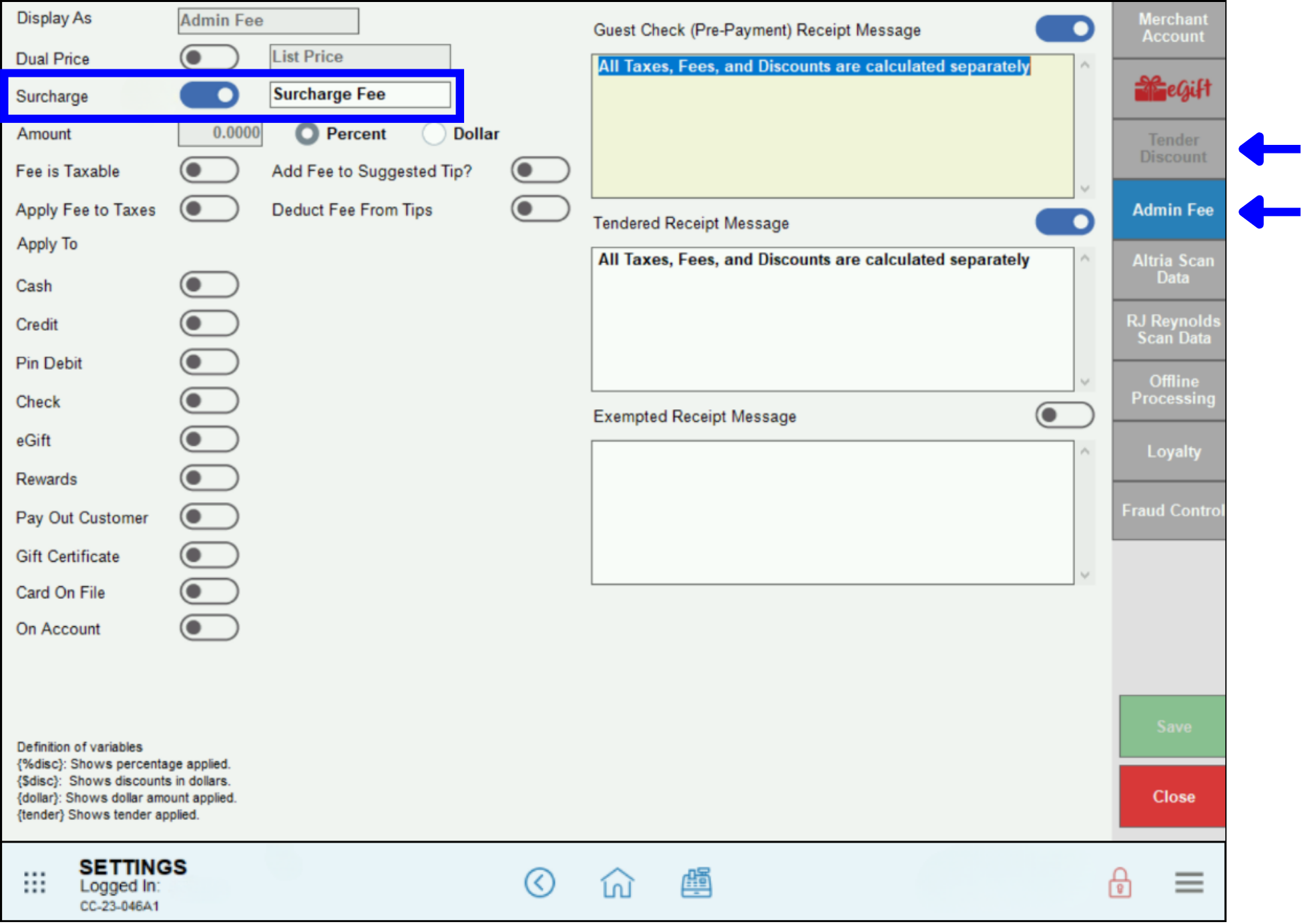
All other toggles on the Admin Fee screen should be inactive. The exact percentage of the surcharge fee amount will be calculated at the terminal by the credit card processor via the card’s unique BIN (Bank Identification Number).
Surcharge Fee Messaging
Merchants can modify or upload custom compliance text for the Surcharge Fee program in the Admin Fee tab. The default text is stored in the system, and can be overridden by customized messaging at the account level. These customized settings will remain consistent across devices and sessions. Prepayment receipt messaging will vary depending on the merchant’s credit card and local/state requirements and regulations.
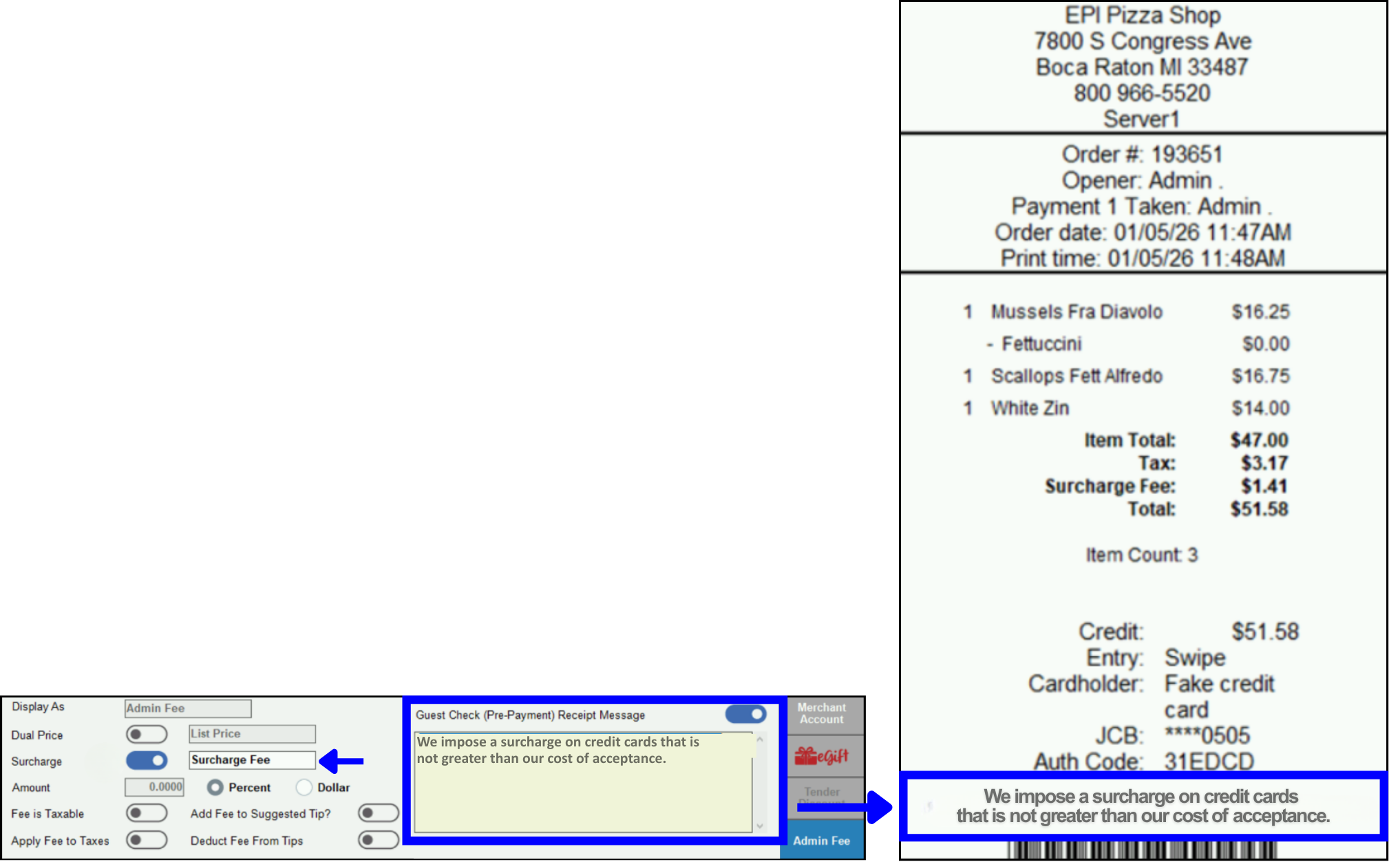
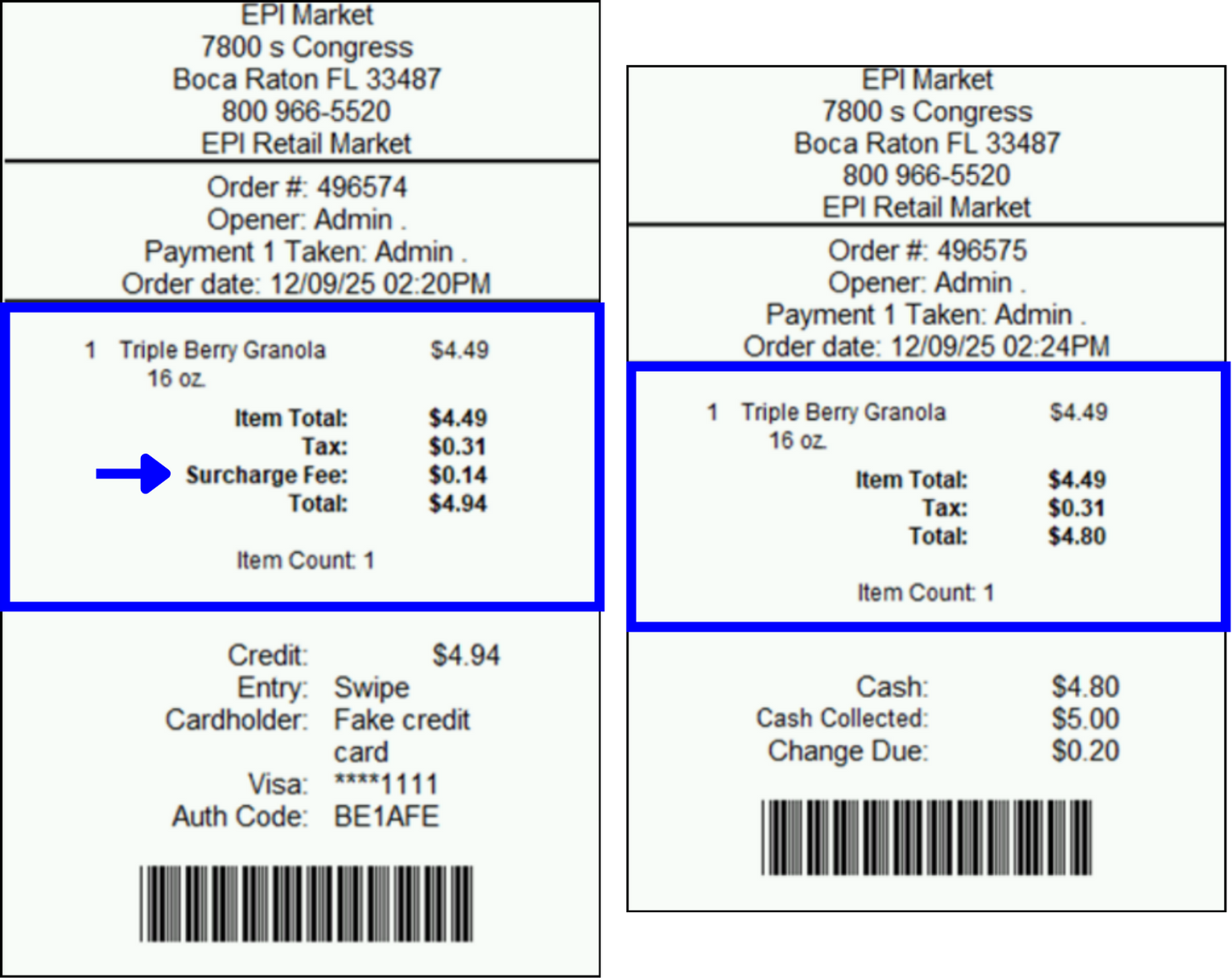
The credit card receipt (below left) includes the surcharge, while the other tender type (cash, check, EBT, debit cards using PINs) receipt (below right) does not include a surcharge.
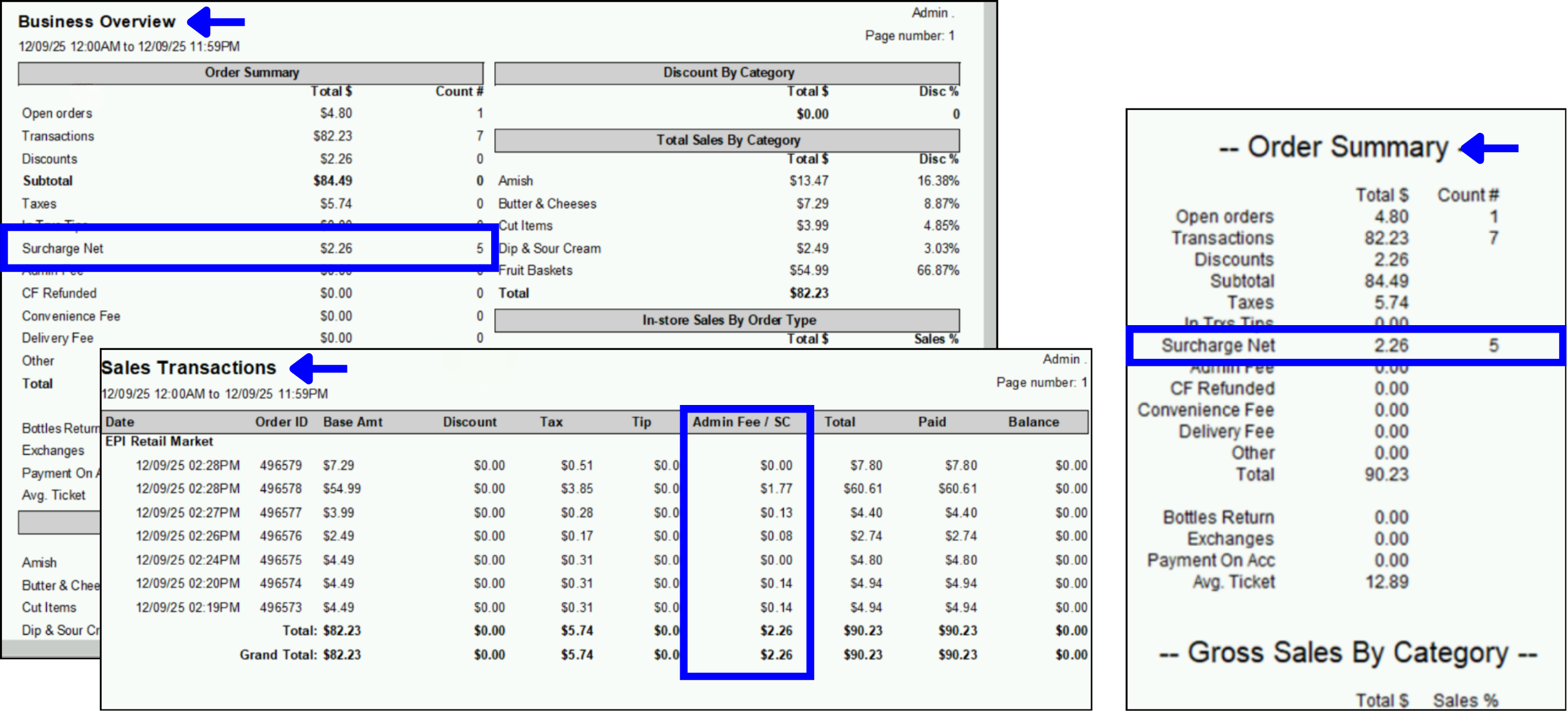
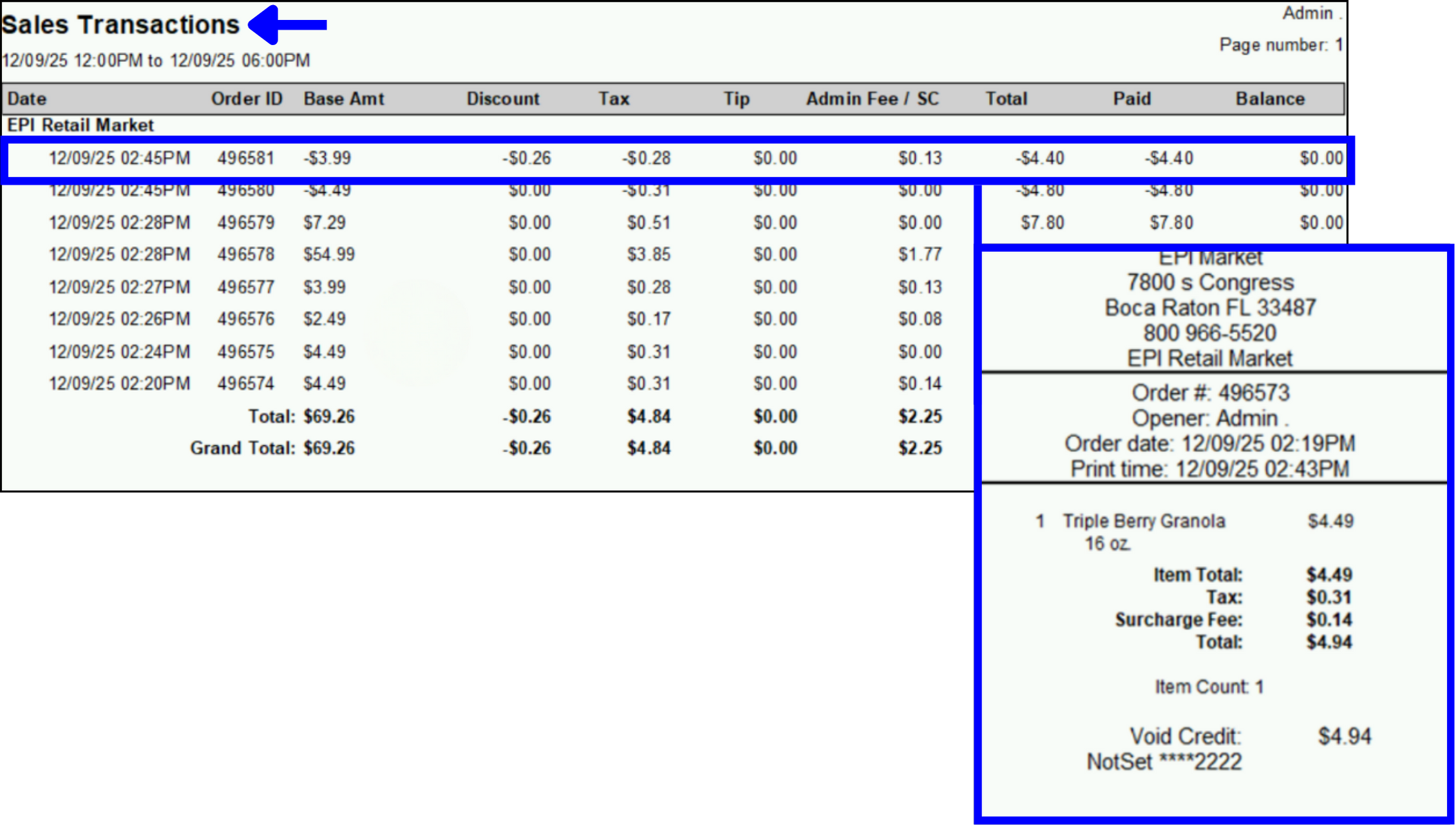
Business Overview, Sales Transactions, and Snapshot reports will separately summarize surcharge totals, as well as include them in gross sales figures. This will allow merchants to reconcile surcharge income and comply with financial reporting standards. Reports for other tenders will display zero in the surcharge fees columns/lines.
- Go to Home > Reports > Sales.
- Select the desired report.
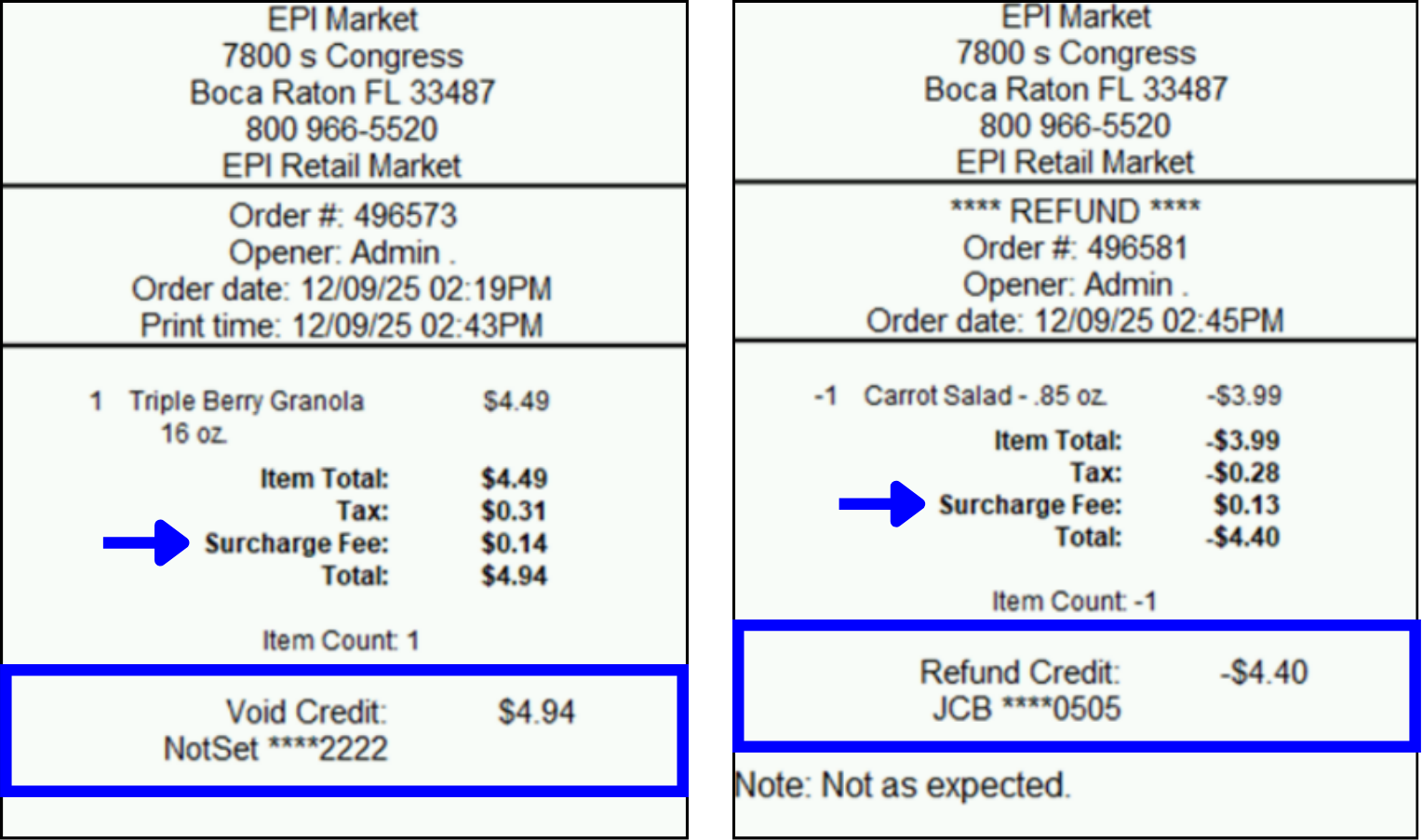
Surcharge fees will be proportionally refunded or reversed when voids or refunds are issued.
Voids
- A full void will reverse both the sales and the associated surcharge.
- Reports will reflect the voided transaction, including the surcharge fee reversal.
- Void receipts will clearly display the voided surcharge fee.
Refunds
- A full or partial refund will return the proportional surcharge fee amount relative to the refunded portion of goods and services.
- Reports will reflect the refunded transaction, including the surcharge fee refund.
- Refund receipts will clearly display the refunded surcharge fee.
How can we improve this information for you?
Registered internal users can comment. Merchants, have a suggestion? Tell us more.