
This article includes Release Notes from the 2026 calendar year.
Release 3.384.1 includes major updates to the RJ Reynolds/Circana and Michigan Liquor (MLCC) functionality. Other updates include enhancements to receipt prompts and tip reporting, as well as various error message resolutions.
RJ Reynolds/Circana Loyalty Program
Loyalty-based discount program capabilities have been implemented for RJ Reynolds/Circana. The capabilities will extend beyond standard ScanData options by introducing consumer-specific loyalty-based discounts, offer validation via customer phone number, and enhanced reporting requirements in RMSC format.
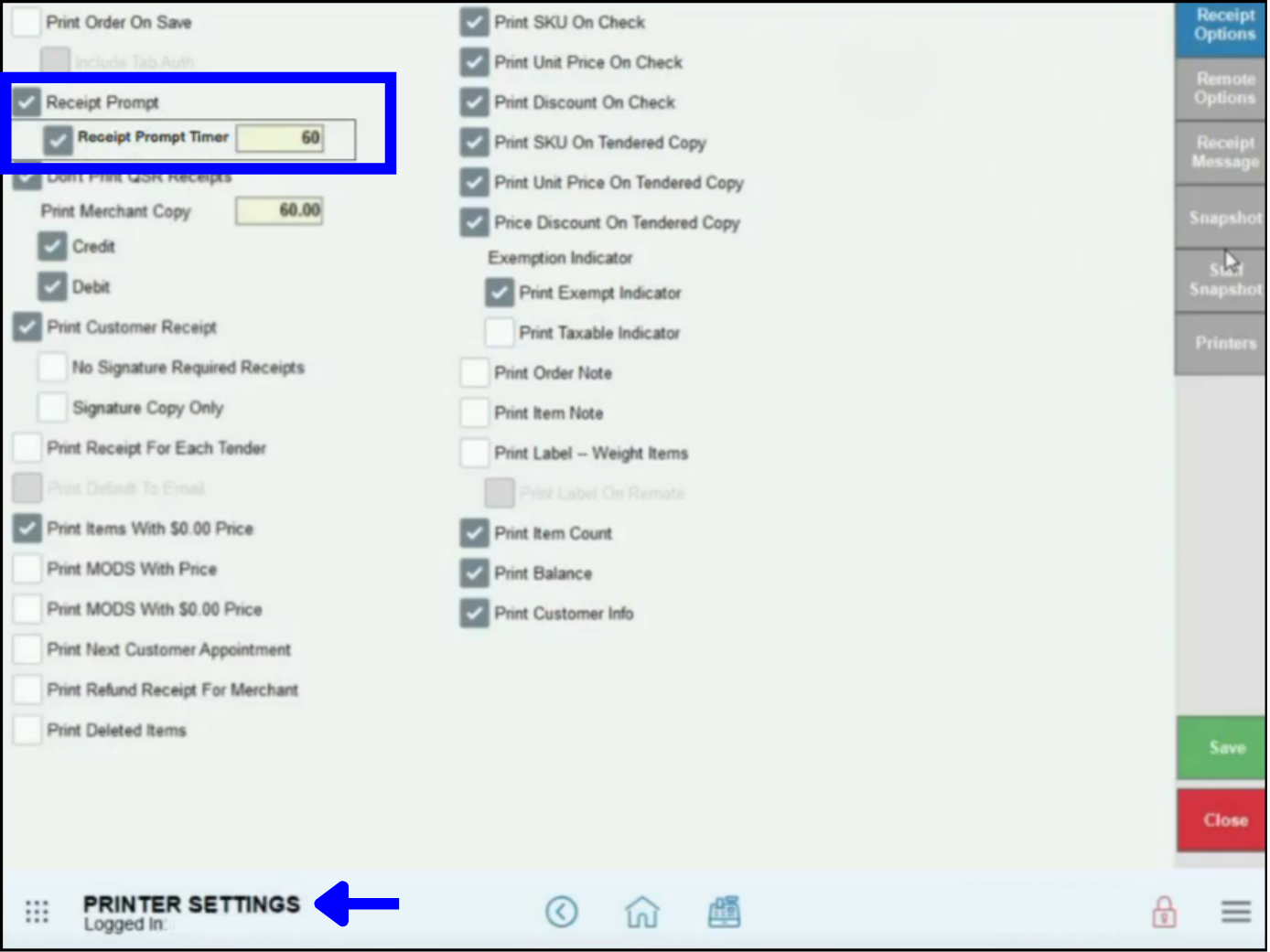
Receipt Prompt Timer
Receipt prompts will have a customizable timer, so that the receipt prompt screen will automatically close after a certain amount of time. This will help prevent new order creation from being blocked by an open receipt prompt screen. The time may be adjusted on the Printer Settings screen.
Sales Completion Time Stamps
Orders will now be marked as completed when paid, rather than the time when the receipt is printed.
Additional Tips on Sales Reports
Additional tips added to the automatic gratuities will now display in Settlement, Sales Transaction, and Business Overview Reports.
XT99 Timeouts
Timeout errors on XT99 have been resolved.
Batch Closed Error Messages on Sidekick
Batch closed Not Found error messages on Sidekick have been resolved.
Tips on Receipts
An error where tips were not updating properly on receipt totals has been resolved.
Clock Outs
An error preventing staff from clocking out has been resolved.
Completed Transaction with Tips
Not Found error messages involving transactions with tips have been resolved.
Michigan State Liquor Updates
- Minimum Requirement Validations: Michigan State Liquor minimum requirements will be automatically applied when liquor item date is imported from the state. This ensures that pricing and inventory date remains compliant with state regulations without manual corrections.
- Holiday Tax Codes: Michigan Liquor pricebook imports will exclude holiday items with tax codes 70000-799999. This will help avoid import and pricing errors when the corresponding holiday items already exist in Exatouch (which only recognizes one SKU per tax code).
- Pricebook Discrepancies: A naming error on the pricing file provided by Michigan Liquor caused August prices not to be uploaded. Data has been successfully uploaded into Exatouch.
- Updated On-Screen Prices: A limited number of Michigan Liquor prices were displaying with on-screen discrepancies vis a vis the most recent price book even after the Update Prices button was selected. The issue has been resolved.
Release 8.384 includes club discount, order refund, age verification, register item, gift card/gift certificate, and reporting enhancements, as well as GUI and language updates.
Special Pricing Programs
To stay in line with updated compliance requirements and other regulations, special pricing programs such as dual pricing, admin and surcharge fees, and tender discounts will require EPI compliance approval prior to activation. Merchant managers and administrators must contact the Exatouch Technical Support Team if they want to activate or deactivate any special pricing programs.
Age Check
An issue where age was not correctly displaying after an age check has been fixed.
Club-Exclusive Discounts
Club discount functionality has been updated to restrict tier-level exclusive discounts.
DeliverMe App
Cosmetic upgrades have been made to the Scan to Pay link in the DeliverMe app.
Enhanced Discrepancy Logging
Credit card transactions, payment reconciliation, and reporting now have enhanced discrepancy logging functionality.
Gift Certificate/eGift Refund Preferences
Order refund functionality has been updated to include gift certificate/eGift refund preferences.
Refactor Updates
Back end updates have been made to the refactor function in certain versions of Exatouch.
Register Display Updates
- Item Detail prices will be reflected on the corresponding Register item.
- Register prices on the display will reflect only the current item, not the previous.
Reporting Updates
- Business Overview Reports: Business overview reports have been updated to show sales total including discounts.
- Customer Accounts Receivable Balance Reports: Date selections are now applicable to Customer AR Balance reports.
- Top Customer Reports: The top 10 customers will now display on the report regardless of selection parameters for top customers.
Release 3.383 includes reporting stabilizations, equipment integrations, and Dual Pricing, credit transaction, and order messaging updates. It also includes ID scanning enhancements, as well as new Michigan Liquor Control Commission code integrations.
Barcode Scanners and Scales
New Barcode Scanner and Scale Integration: Exatouch now fully supports the new CipherLab 1204 2D Barcode Scanner across all workflows, allowing for better integration with product, receipt, gift card/certificate, and age verification. Other new products include:
Business Overview Reports
- Business Overview Reports Queries: Business Overview queries have been updated to improve overall report processing stability and execution time.
- Business Overview Subtotal Discrepancies: Business Overview calculations have been standardized to align subtotals in various sections with totals for sales by Category.
- Business Overview Penny Rounding Discrepancies: Penny rounding discounts have been recalibrated to ensure they are consistely displayed across all reporting modules.
Complete Authorization
Transaction visibility in Complete Authorization: All credit card sales will now show in Complete Auth.
Dual Pricing
Dual Pricing Tax Application: Dual Pricing has been updated to ensure applicable taxes are properly calculated and displayed for both card and cash (list) prices.
ID Scanning
ID Scanning During Age Check: ID scanning errors have been resolved.
Michigan Liquor Merchants Only
New 6-Digit Liquor Codes: Exatouch has been updated to support, process, and validate the new Michigan Liquor Control Commission (MLCC) 6-digit liquor codes. Compatibility with the pre-existing 5-digit MLCC codes remains the same.
Modify All Items
Mod All Pricing Updates: Item pricing is now consistently updated during the bulk price adjustment process; items updated during the Mod All process will immediately reflect new retail prices.
Partially Paid Order Messaging
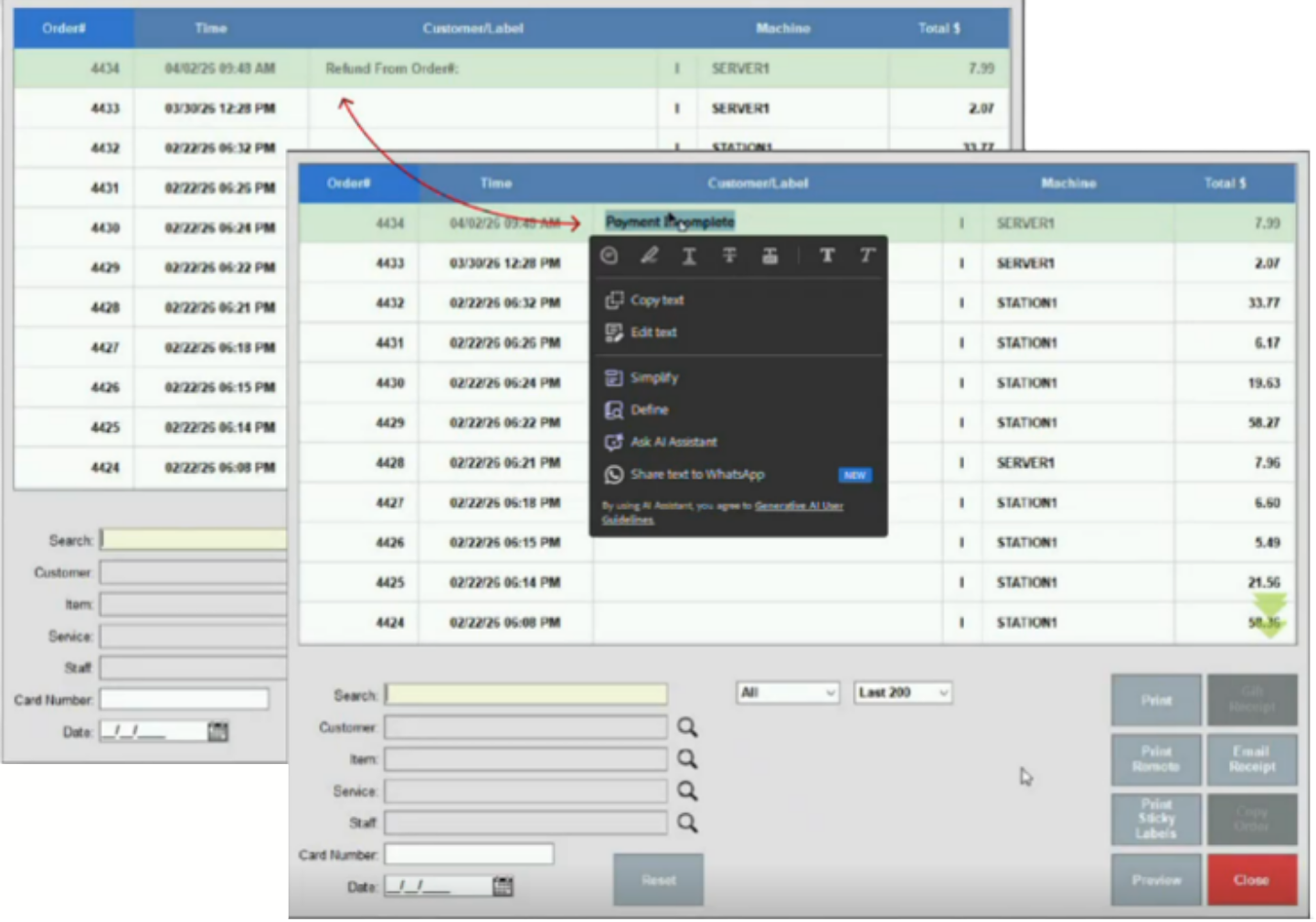
Partially Paid Order Messaging on Refund and Reprint Modules: Partially paid orders will now display a “Payment Incomplete” message in both the Refund and Reprint modules. (Register > Local Menu > Refund or Reprint > Find Order)
Tip Reporting
Tip Calculations on Settlement and Payment Transactions Reports: Tip reporting calculations have been updated to ensure consistent, accurate display across all reporting views.
In Release 8.382, operational and user upgrades were implemented across a wide range of Exatouch functions, including Dual Pricing, ScanData, scales, EBT, Business Overview and Tax reports, discounts and promos, labels, price imports, tips, and loyalty accounts.
Business Overview Reports
- Sales by Category Totals and Report Subtotal Discrepancies: Business Overview subtotals will now match the Sales by Category totals.
- Data Loading and Report Generation: Enhancements to Business Overview queries will result in more effective data loading and report generation.
CRM on Account
Account Order History Synching: On Account balance functionality has been updated so that customer order histories sync correctly after transactions are completed.
Datalogic Magellan Scale 9600i
Power Interruption Error Messages: The occurrence of the “Power Interruption Detected. Check Scale” error message that appeared even after power was restored and full scale functionality resumed has been resolved.
Discounts and Promos
Report and Reprinted Receipt Discrepancies: Reports and reprinted receipts will now accurately reflect discount, coupon, and promo transactions totals.
Dual Pricing
Receipt Discrepancies: Receipt discrepancies between Dual Pricing transaction totals and individual items has been resolved for card-based tenders.
EBT
- EBT Cash/Food Tenders Added After Rewards Tender: EBT cash and EBT food tender can now be used even if a rewards tender (such as loyalty points) is processed first during payment.
- EBT Food Transactions for Weighted Items: EBT food transactions involving weighted items will no longer show a -0.01 balance after order completion.
Label Previews
Label Previews and Actual Printed Labels: All label preview renderings will now align with the printed label formatting.
Loyalty Accounts
Field Labeling in Loyalty Accounts: Labeling inconsistencies in in Home > Settings > Account > Loyalty have been updated for user clarity.
Price Imports
Pricing Input Processing and Validation: Processing updates to prevent the unintended import of negative pricing will ensure proper handling and validation of pricing inputs when using import templates.
Scan Data
- Submission Refusals Due to Incomplete Phone Numbers: Scan Data submission refusals stemming from incomplete phone numbers has been resolved; with Release 8.382, all submissions must include 10-digit telephone numbers at point of entry.
- Bearer Token Authentication: O-Auth 2.0 Bearer Token Authentication has been implemented for integration in Exatouch.
- Price Promotion Retrieval: AGDC Price Promotion Retrieval has been implemented for integration in Exatouch.
Tax Reports
Split Reports for Multiple Tax Table Effective Date Ranges: Tax reports with data spanning two tax table effective date ranges will now be split into two separate sections, one with the data prior to the effective date r and one with the data after the effective date.
Tips
- Tip Adjustment Auto Completion: Intermittent tip adjustment auto-completion and inaccessibility issues in the Complete Auth workflow have been resolved.
- Routing of Tips Added Via the CFD: Customer-entered tips added through the CFD will now route directly to the Review screen rather than the Complete Auth screen.
In Release 8.381.2, reporting, refund, receipt, and coupon/promo application inconsistencies have been resolved.
Coupons and Promos
- Transaction receipts for orders with 100% discount applied will not display dual pricing on the item.
- 100% coupon amounts will be displayed in the printed total at the bottom of the receipt.
Dual Pricing
Dual pricing discrepancies between initial and reprinted receipts have been resolved.
Gift Card Refunds
Gift card refunds have been upgraded to ensure proper allocation and reporting, and prevent duplicate processing. Refund receipts will display masked card numbers (e.g., ****1234), consistent with the original sales receipt and reporting.
Tax Reporting
Current tax reporting data has been aligned across Snapshot, Business Overview, Sales Transactions, and Tax reports.
In Release 8.381, enhancements and functionality upgrades have been made to special pricing programs (dual pricing), reports, accounts receivable, ScanData, and Exatouch agent-only demos.
Accounts Receivable
Functionality has been improved for on-account tenders processed on the Register, AR balance payments, and past due amounts/totals.
Completed Orders
Orders will now auto-close and generate a completed payment receipt after the Change Due/Receipt prompt screen closes. Note that this only applies to systems using the DataLogic Magellan scanner/scale on version 376.4 or older.
Dual Pricing
Dual Pricing will automatically be applied to the following:
- Entire order with percentage off promo
- Club discounts
- Any card tender type with Altria ScanData loyalty amounts
Exatouch Agent-Only Demos
Exatouch agent-only demos have been upgraded to current release versions in all verticals.
Reporting
Increased functionality has been added to the following reports:
- Shift
- Tax
- Staff Snapshot
- Staff Shift
- Customer Accounts Receivable Balances
Reporting and activity logs have also been enhanced.
ScanData Submissions
Additional logging and reporting granularity has been implemented to improve visibility and resolution response times for submission, merchant configuration, file generation, and third-party response errors.
Tips
Fees can now be deducted from tips entered from the Complete Auth tab.
In Release 8.380, enhancements have been made to the data processing functionality for large reports. Price formatting for Michigan liquor merchants has also been updated.
Large Dataset Reports
The report functions have been updated to more efficiently process reports with large datasets and/or extended timeframes.
Michigan Liquor Pricing
The Item Details page has been updated to accommodate the new price formatting rolled out by the Michigan state liquor board.
In Release 8.379, updates and enhancements have been made to workflow and database functionality, various user interface/design elements, and other features listed below.
Card on File
See Card on File for more information.
eGift and Gift Certificates
- eGift and Gift Certificate (Local Gift Card) Check Balance buttons will be disabled on the Register > Pay tab when eGift/Gift Certificate functionality is disabled in Settings > Activation.
- Receipt prompts will now appear when scanning a Gift Certificate as payment when the touch Customer Facing Display (CFD) is enabled.
Required Fields in Details Screens
All required fields in details screens have been marked with a red * asterisk, including:
- Staff (Home > Staff > Staff Details)
- Customer (Home > Customer > Customer Details)
- Vendor (Home > Purchasing > Vendor Details)
- Business (Home > Settings > Business Details)
- Service (Home > Items > Service Details)
Quick Menu Item Buttons
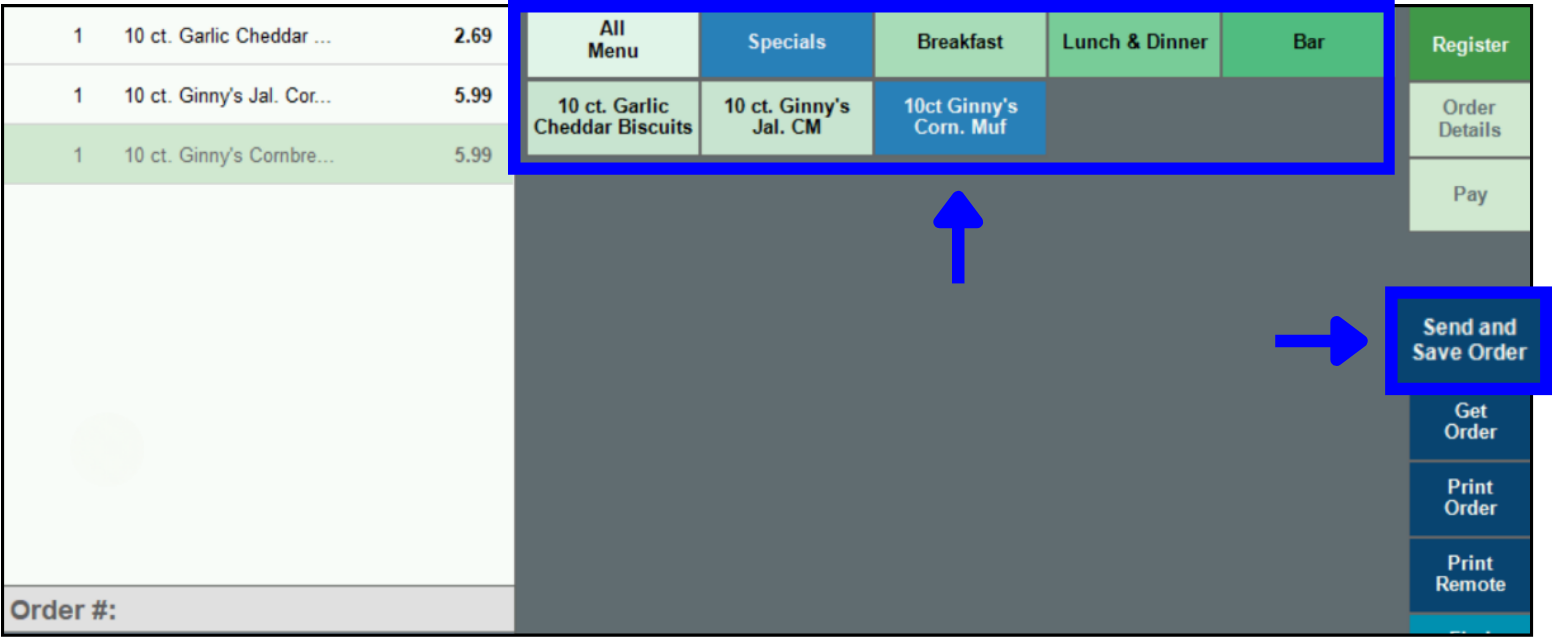
The color scheme of the Quick Menu Item buttons in the Register has been enhanced for greater accessibility and visibility (see image below).
Send and Save Order Button
The Send Order button in the Register has been updated to read Send and Save Order (see image above).
Release Notes 8.378.1
In Release 8.378.1, a new special pricing/fee mitigation program was rolled out, and email issues were resolved.
- Surcharge Fee Program – see Enable Surcharge Fees (Surcharge Fee Program) for more information.
- Issues around Near Real Time Data (NRTD) emails were resolved.
How can we improve this information for you?
Registered internal users can comment. Merchants, have a suggestion? Tell us more.