
This article includes Release Notes from the 2026 calendar year.
In Release 8.380, enhancements have been made to the data processing functionality for large reports. Price formatting for Michigan liquor merchants has also been updated.
Large Dataset Reports
- The report functions have been updated to more efficiently process reports with large datasets and/or extended timeframes.
Michigan Liquor Pricing
- The Item Details page has been updated to accommodate the new price formatting rolled out by the Michigan state liquor board.
In Release 8.379, updates and enhancements have been made to workflow and database functionality, various user interface/design elements, and other features listed below.
Card on File
- See Card on File for more information.
eGift and Gift Certificates
- eGift and Gift Certificate (Local Gift Card) Check Balance buttons will be disabled on the Register > Pay tab when eGift/Gift Certificate functionality is disabled in Settings > Activation.
- Receipt prompts will now appear when scanning a Gift Certificate as payment when the touch Customer Facing Display (CFD) is enabled.
Required Fields in Details Screens
All required fields in details screens have been marked with a red * asterisk, including:
- Staff (Home > Staff > Staff Details)
- Customer (Home > Customer > Customer Details)
- Vendor (Home > Purchasing > Vendor Details)
- Business (Home > Settings > Business Details)
- Service (Home > Items > Service Details)
Quick Menu Item Buttons
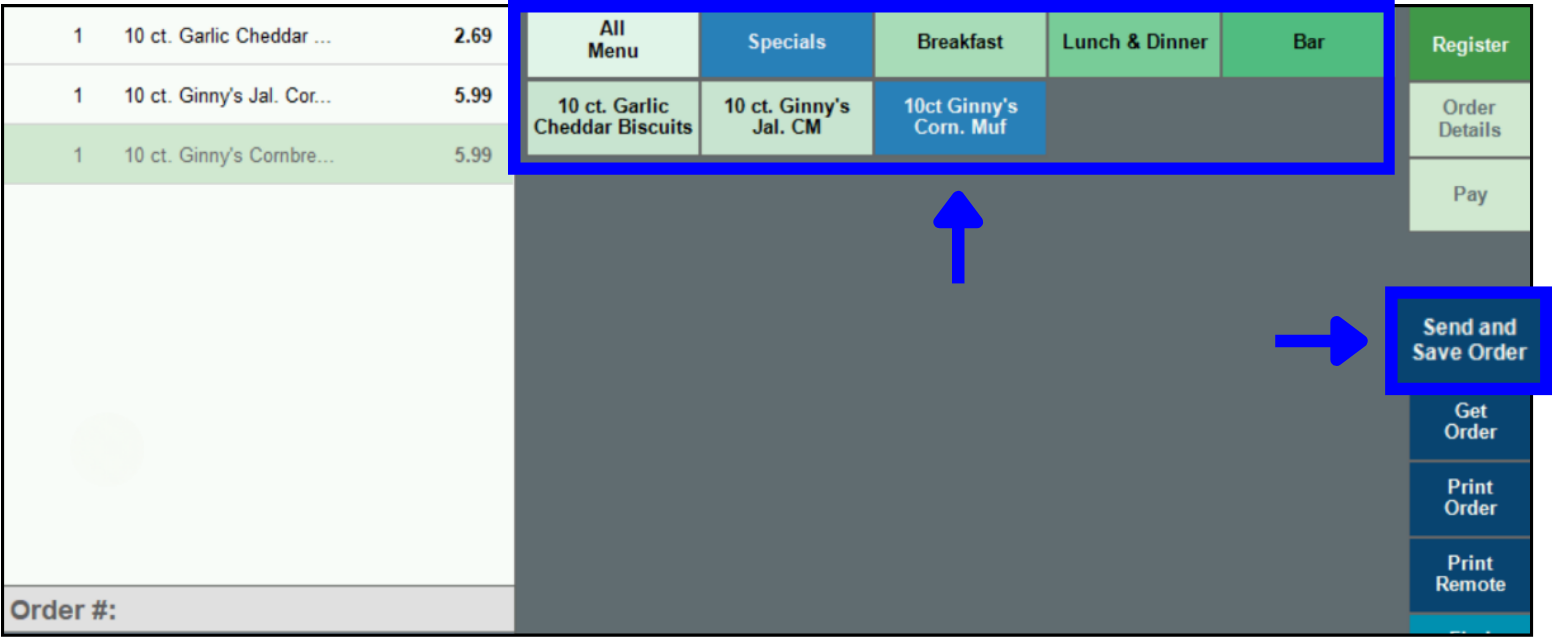
- The color scheme of the Quick Menu Item buttons in the Register has been enhanced for greater accessibility and visibility (see image below).
Send and Save Order Button
- The Send Order button in the Register has been updated to read Send and Save Order (see image above).
Release Notes 8.378.1
In Release 8.378.1, a new special pricing/fee mitigation program was rolled out, and email issues were resolved.
- Surcharge Fee Program – see Enable Surcharge Fees (Surcharge Fee Program) for more information.
- Issues around Near Real Time Data (NRTD) emails were resolved.
Back to Top
How can we improve this information for you?
Registered internal users can comment. Merchants, have a suggestion? Tell us more.